Git worktrees for parallel AI features
While trying to get more familiar with Claude Code, I noticed it leveraged git worktree under the hood. So does Cursor with parallel agents. This is a git feature I only discovered recently. Turns out, git worktrees are a natural fit for AI-assisted development of multiple features in parallel.
What are git worktrees?
A worktree lets you check out multiple branches of the same repo simultaneously in separate directories. No stashing, no switching. Each worktree is a fully functional working copy tied to a branch, sharing the same .git history. Example structure could look like this.
..
├── workspaceFolder             # git worktree add ~/workspaceFolder-auth -b feat/auth
├── workspaceFolder-auth        # full copy on feat/auth branch
└── workspaceFolder-hotfix
Why is this useful?
Parallel AI-assisted development: These days, AI-assisted development often involves kicking off multiple agent sessions. For agents to not interfere with each other, it is good practice to have isolated workspaces. This is exactly what worktrees do… With minimal overhead, you can create copies of your git workspace and spawn coding agents in your worktrees. The agents will work on their own respective isolated directories after which you can merge and consolidate their outputs.
No more stash-and-commit:
git stashis actually the reason I didn’t know of worktree. Whenever I needed a quick switch to another branch for reviews or quick fixes,git stashhelped me. Although this works,worktreefeels much more intuitive since you are actually seeing the files in your filesystem.
Demo setup
I’ll use yt-recipes, a small Streamlit app I wrote for LLM-powered recipe summarization. Let’s say I want to develop 2 features in parallel:
- Switch from Google to a generic LLM provider via OpenRouter
- UI/UX improvements
Clone the repo and create a worktree per feature as sibling folders:
cd $(mktemp -d)
pwd
git clone https://github.com/sinanpl/yt-recipes.git
cd yt-recipes
git worktree add ../feat-generalise-llm-provider -b generalise-llm-provider
git worktree add ../feat-more-user-friendly-ui -b more-user-friendly-ui
/var/folders/qp/16cvclv15n94gn6jld62xc8m0000gn/T/tmp.QIyGKaqXc8
Cloning into 'yt-recipes'...
remote: Enumerating objects: 18, done.
remote: Counting objects: 100% (18/18), done.
remote: Compressing objects: 100% (16/16), done.
remote: Total 18 (delta 0), reused 18 (delta 0), pack-reused 0 (from 0)
Receiving objects: 100% (18/18), 517.02 KiB | 11.00 MiB/s, done.
Preparing worktree (new branch 'generalise-llm-provider')
HEAD is now at 1fd9a2a first commit
Preparing worktree (new branch 'more-user-friendly-ui')
HEAD is now at 1fd9a2a first commitThe resulting structure with tree looks like:
tree -L 1 ....
├── feat-generalise-llm-provider
├── feat-more-user-friendly-ui
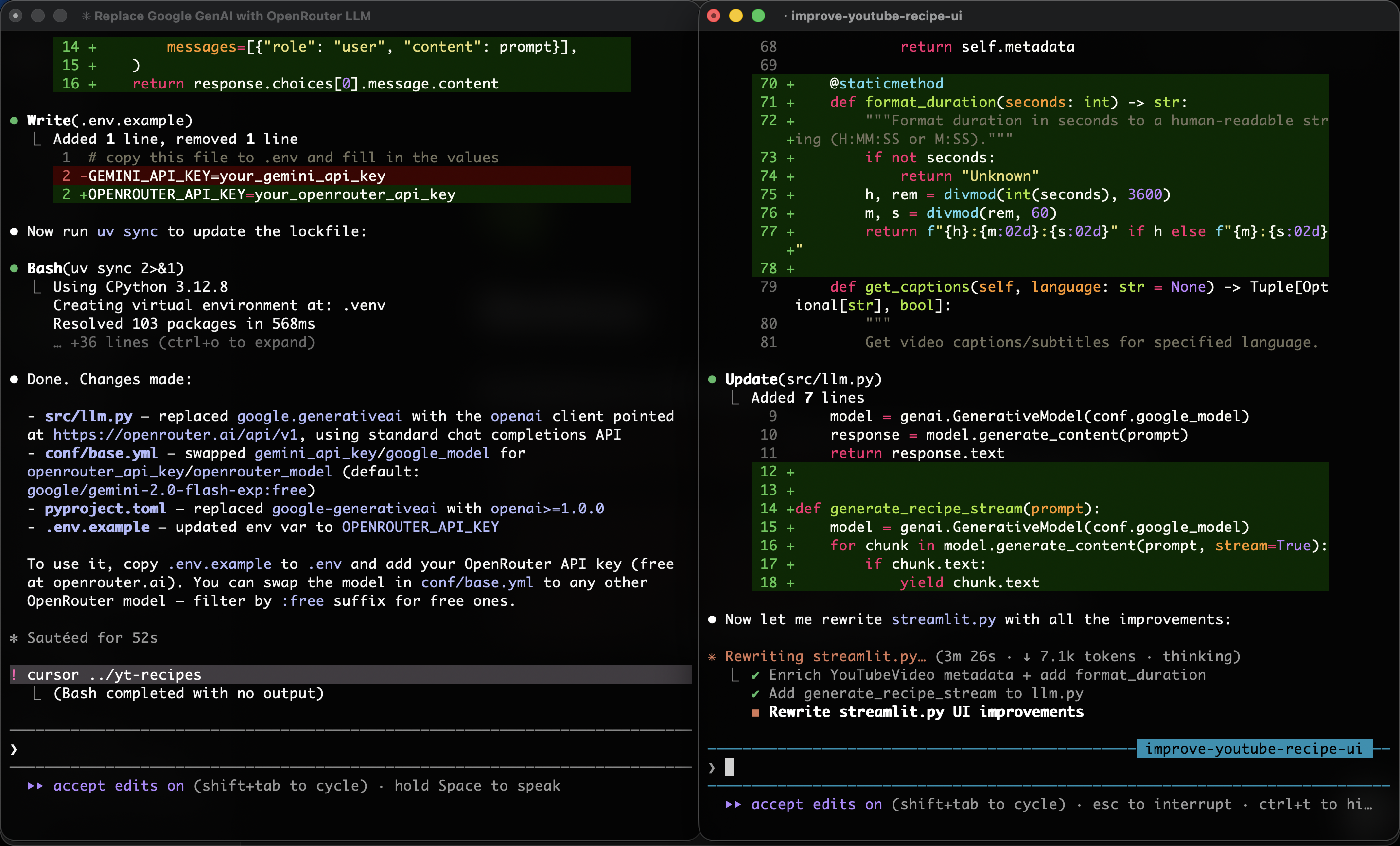
└── yt-recipesEach folder is an independent working directory on its own branch, sharing the same git history. Now you can spin up an agent through your terminal (or IDE) per worktree. Each agent works on its own branch in its own directory which means no interference.
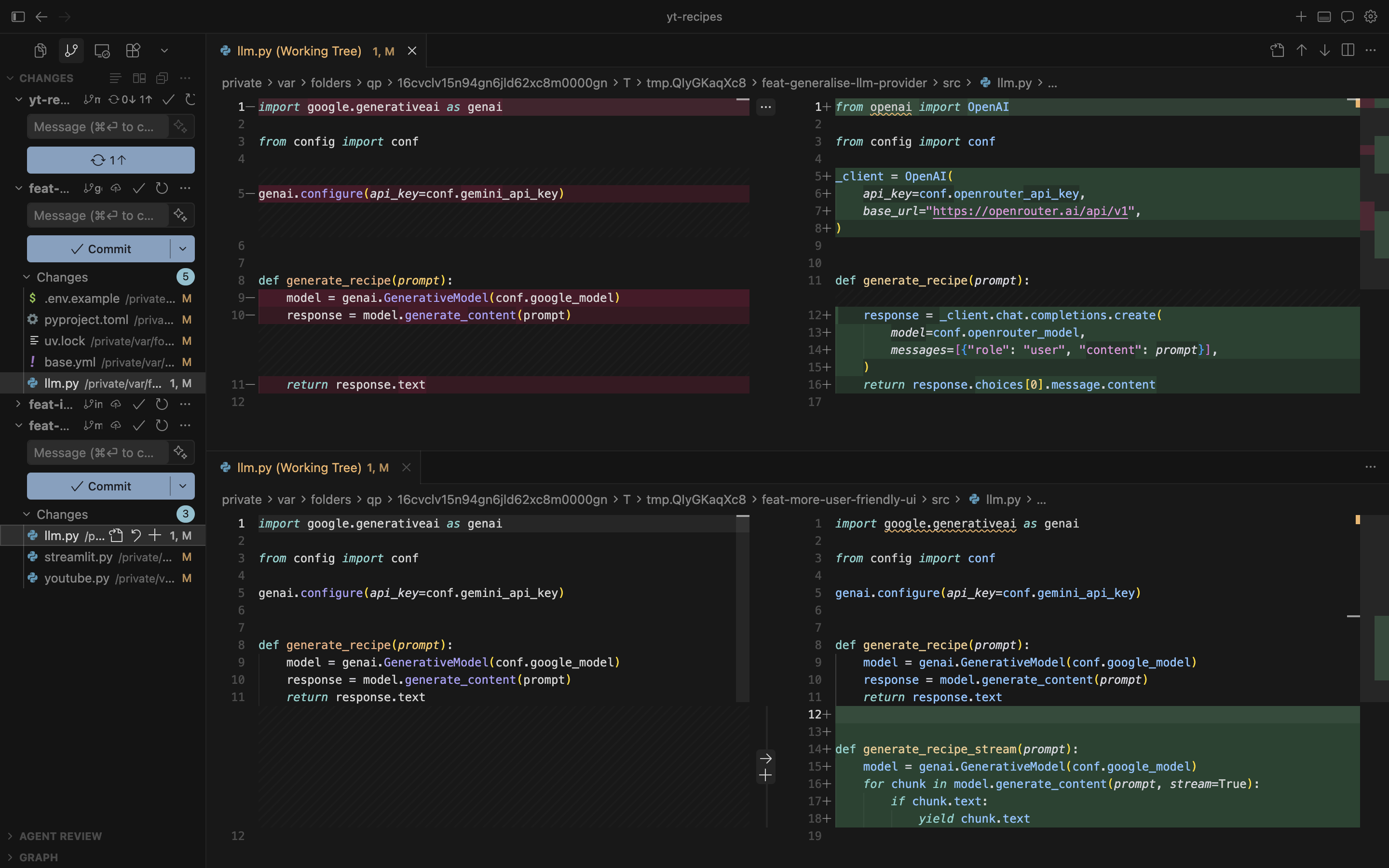
Below, both worktrees show independent changes to llm.py. The top diff swaps google.generativeai for an OpenAI-compatible client via OpenRouter, while the bottom adds a generate_recipe_stream function for better UX with streaming. Without worktrees, the agents would likely have interfered with each other. When bringing these changes all together, you still need to handle the conflicts, but this helps having more control over it.
Consolidating
Once agents are done, it’s standard git from here. Review the changes in each worktree, stage and commit:
cd ../feat-generalise-llm-provider
git add .
git commit -m "swap google for openrouter"
# ... repeat for other feat
Then merge. You can either push to a remote and open a PR for review, or merge directly into your target branch. In my case, I merged directly from the yt-recipes folder (main branch):
cd ../yt-recipes
git merge more-user-friendly-ui    # -> clean merge
git merge generalise-llm-provider  # -> merge conflict in llm.py
Since both agents modified llm.py, as expected, the second merge produces a conflict. After resolving you can clean up the worktrees:
git worktree remove ../feat-generalise-llm-provider
git worktree remove ../feat-more-user-friendly-ui
Conclusion
Worktrees are a nice trick for running multiple AI agents in parallel without them stepping on each other. Most importantly, it’s very easy to set up.
Of course, spinning up more agents doesn’t mean being more productive. You still need to strike a good balance there as it’s quite easy to overdo it and lose the overview.
What I’m curious about is how IDEs will handle this going forward. I wasn’t aware of any feature in Cursor similar to worktree until I discovered it in Claude Code. It seems Cursor does this too under the hood, where Claude Code has this as an explicit feature you can enable / disable. Either way, it’s a good concept to understand, even if your IDE abstracts it away.